FileSentinel · Windows & macOS
Know what’s hidden in your files, before you share them.
FileSentinel scans your files and folders for sensitive data: Social Security numbers, payment cards, health records, credentials, and the metadata you forgot was there. Everything runs on your device. It collects nothing and makes no network connections to do its work.
v1.5.0 · Local-first · No cloud · OCR included · Redact & clean · Windows 10/11 & Mac

By the numbers
Why it matters
Every share is a risk. FileSentinel checks first.
Most data leaks aren’t dramatic hacks. They’re an attachment with a hidden column, a screenshot with a token, a PDF with a patient name. Small mistakes, real damage.
Sharing blind
- Hidden columns, comments, and tracked changes go out with the file
- Screenshots and scans carry visible SSNs, cards, and account numbers
- Photos leak GPS coordinates and device IDs in their metadata
- API keys and passwords sit forgotten in exports and config files
- One wrong attachment can trigger a reportable breach
- Cloud scanners ask you to upload the very data you're protecting
FileSentinel
- Scans deep into documents, spreadsheets, images, and PDFs
- OCR reads sensitive text inside screenshots and scanned pages
- Ranks findings by severity and confidence so you triage fast
- Redacts values and strips metadata to a clean copy in one click
- Runs entirely on your device, so files never leave your machine
- Built by a cybersecurity firm that lives in this threat model
Features
A full data-discovery toolkit, on your desktop.
Find it, understand it, fix it. FileSentinel covers the whole loop, from deep content scanning to one-click remediation, without a single byte leaving your machine.
Deep content scanning
Reads inside documents, spreadsheets, text, and PDFs to surface personal identifiers, payment data, health info, and secrets, not just file names.
Crown Jewels
Choose the data that matters most to you. Matching findings are escalated so your highest-risk exposure rises straight to the top of the list.
OCR for images & scans
Turns on text recognition for JPG, PNG, TIFF, WebP, and image-based PDFs, catching sensitive data hidden inside screenshots and scanned paperwork.
Confidence & severity
Every finding is scored for confidence and severity, so you can separate verified Critical hits from likely false positives at a glance.
Watched folders
Pick folders to monitor continuously. New or changed files are scanned automatically and a toast tells you the moment something needs attention.
Redact & strip metadata
Remediate in place: redact sensitive values or strip metadata to a clean copy. A full remediation history records exactly what changed.
Custom rules
Add your own detectors with plain-text or regex matching for project code names, internal IDs, or client identifiers, and flag them as Crown Jewels.
Exportable reports
Generate clean CSV, HTML, or PDF reports filtered by severity and confidence, for an audit trail, a colleague, or your own records.
100% local processing
Scanning, OCR, and remediation all happen on-device. No server, no cloud, no upload step. The data you're protecting never has to leave to be checked.
How it works
Scan. Review. Remediate.
Point FileSentinel at a folder, read a prioritized list of what it found, and clean up the risky bits before anything goes out the door.
Drag a folder or file in, add a network share, or run a Quick Privacy Check. Filters and OCR are one toggle away. Everything reads locally.
Findings arrive ranked by severity and confidence, grouped by file and asset tier. See what was found, where, and why, with the value redacted.
Redact values, strip metadata to a safe copy, mark false positives, or export a report. Then share knowing exactly what's inside.
Dashboard: protection score and exposure at a glance.
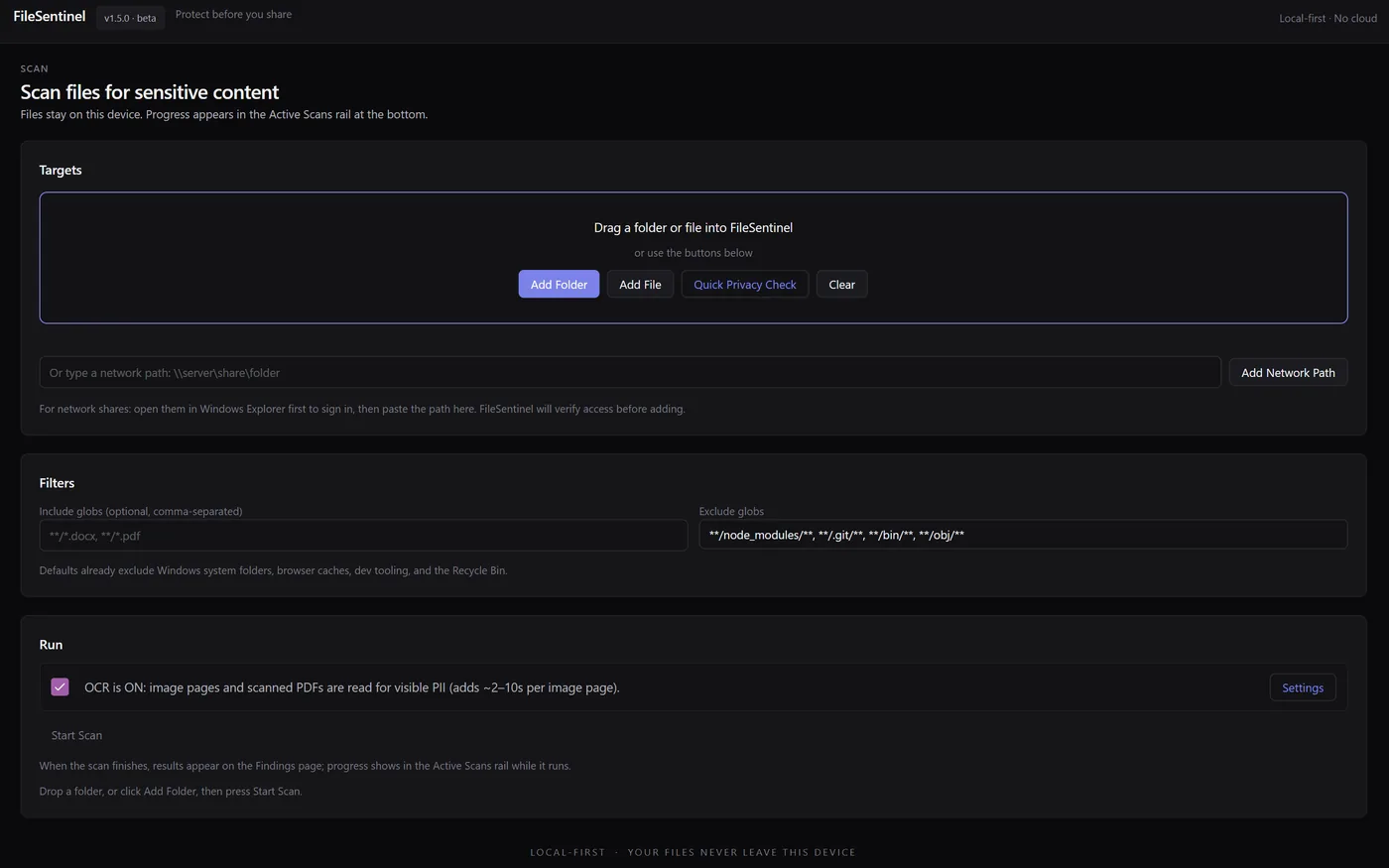
Scan: drop a folder, set filters, toggle OCR, start.

Results: ranked findings with inline remediation.
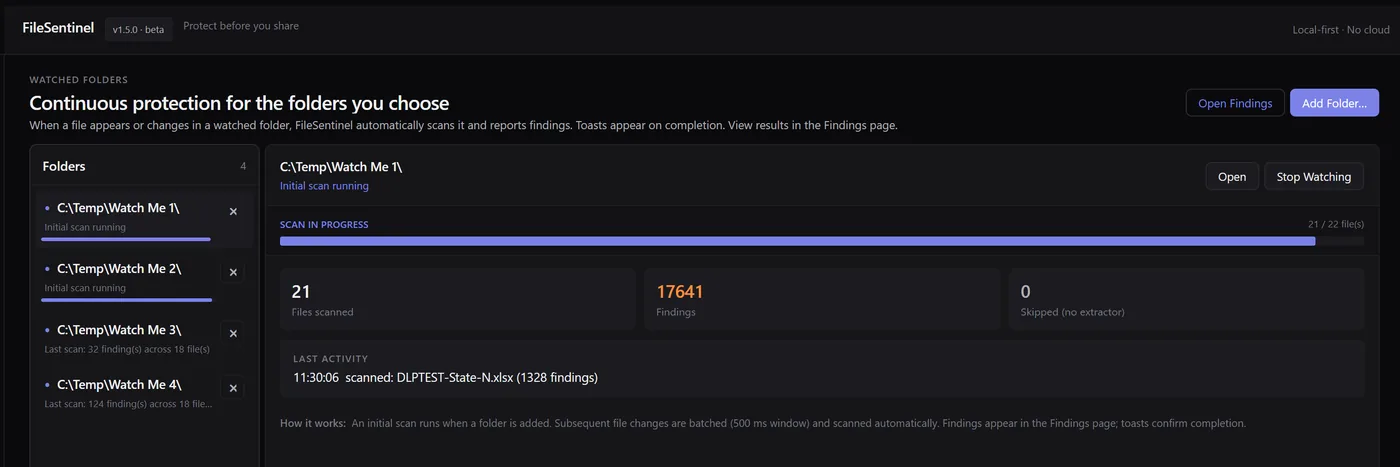
Watched: continuous protection for chosen folders.
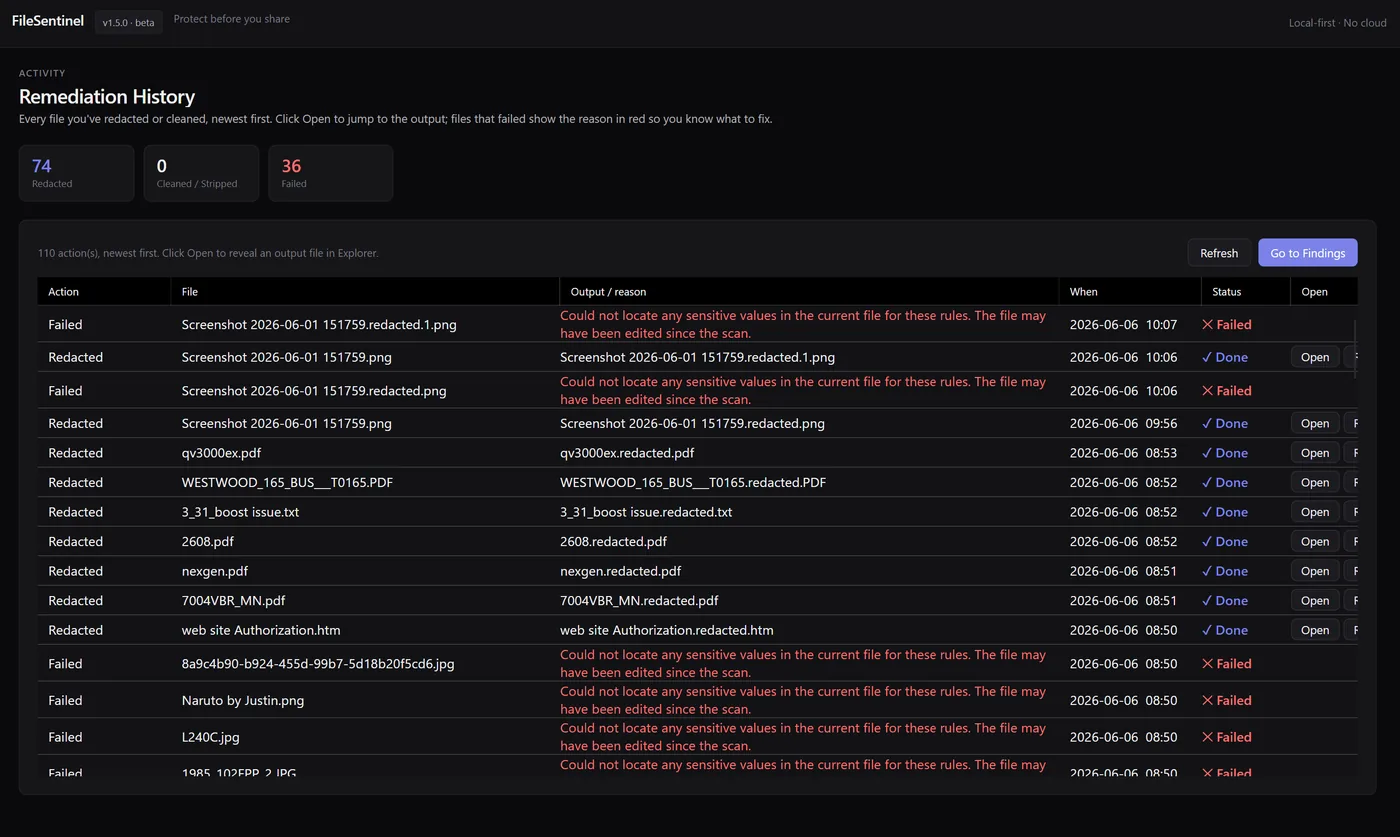
Remediation: a full history of what changed, and where.
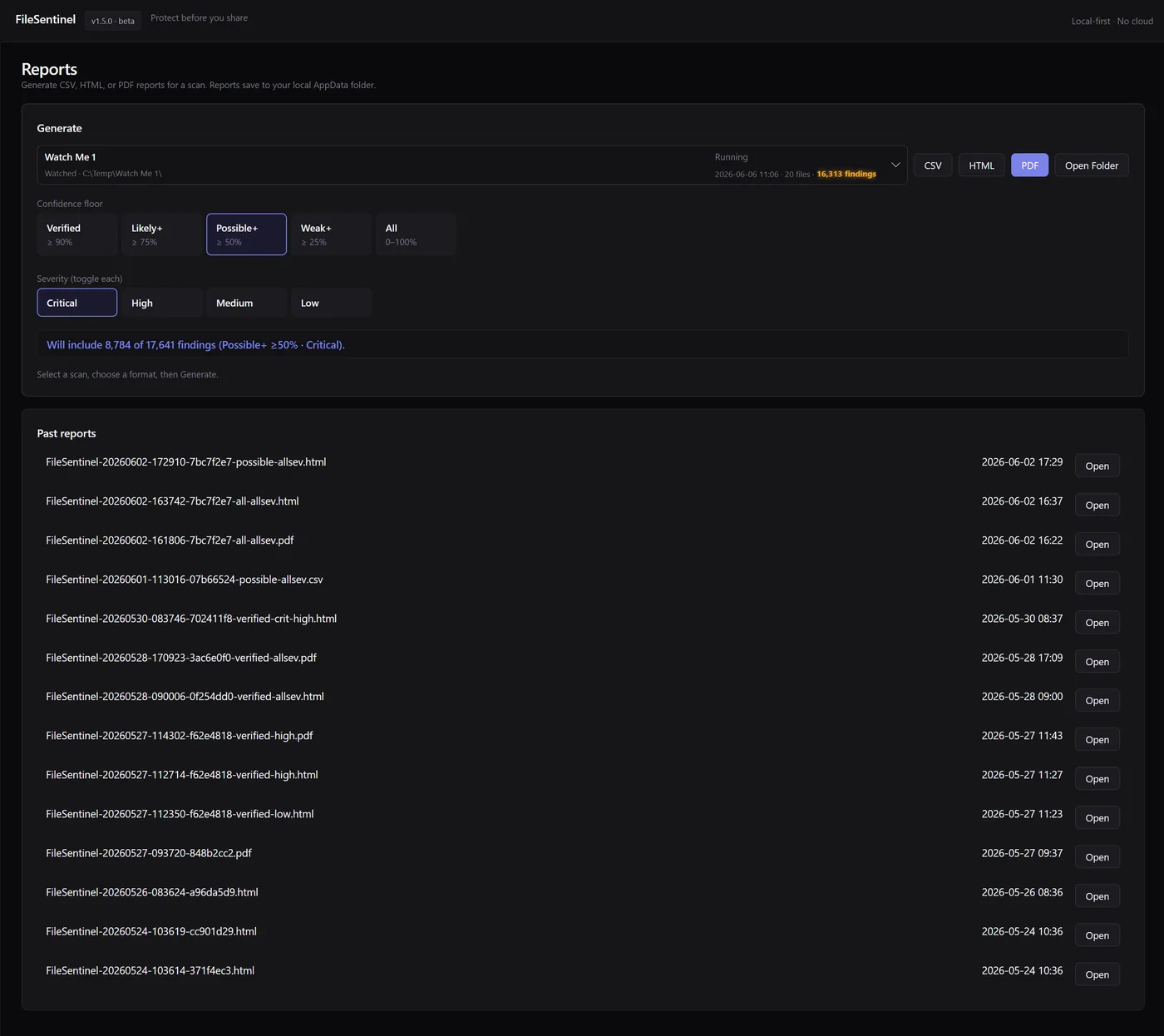
Reports: export by confidence floor and severity.
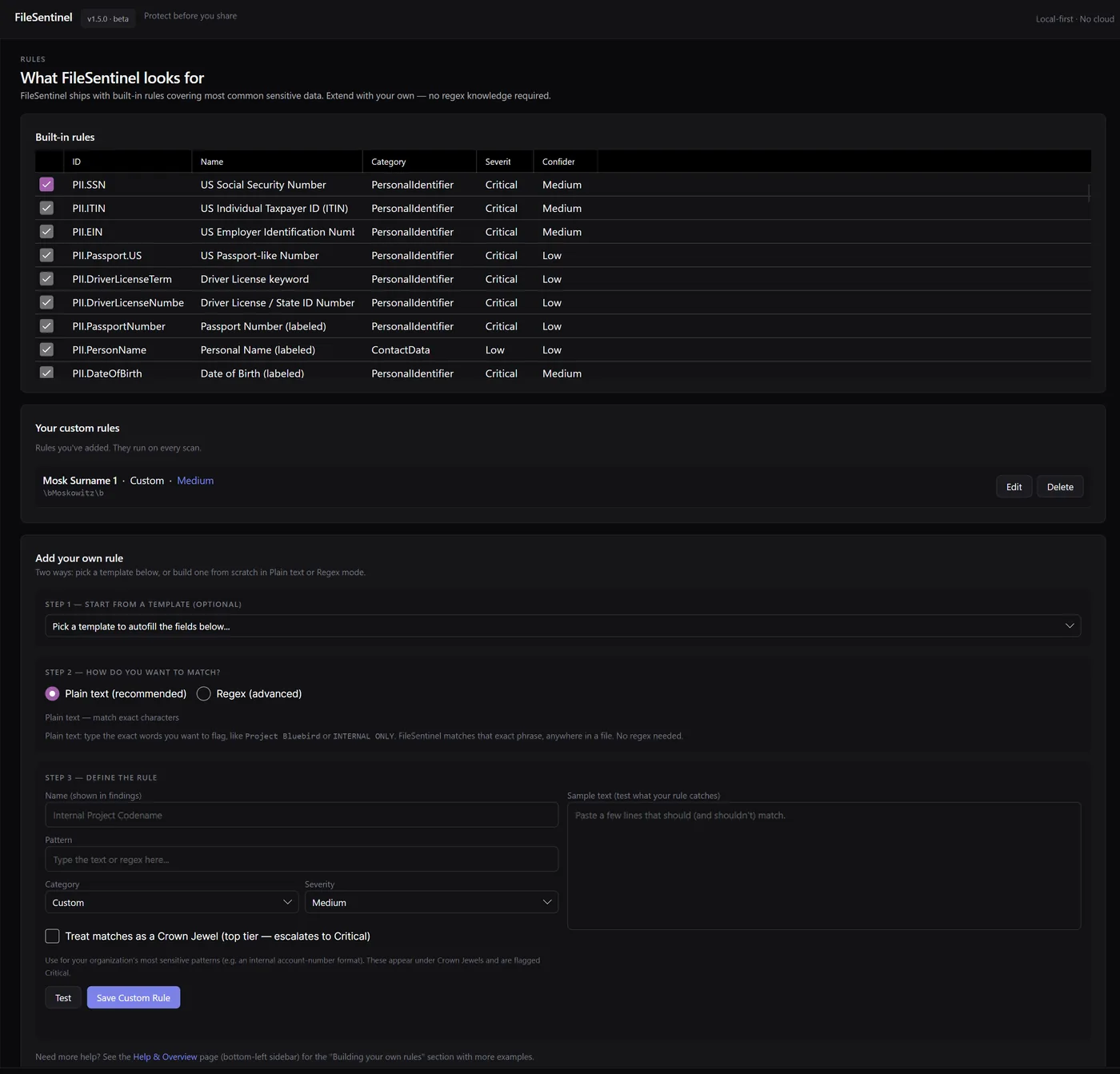
Rules: built-in detectors, plus your own.
What it finds
Seven asset tiers, one clear picture.
FileSentinel sorts what it finds into tiers, so you instantly understand the shape of your exposure. Built-in detectors cover the common cases, and custom rules cover the rest.
See every scanner and what it finds
Crown Jewels
Top priority- The categories you mark as most critical
- Matching findings are escalated to the top tier
- Driven by the Crown Jewels you choose in settings
- Your most damaging exposure, surfaced first
Personal identifiers
PII- US Social Security numbers and taxpayer IDs
- Passport and driver-license numbers
- Dates of birth and personal names
- Strong identifiers that drive identity theft
Payment cards
PCI- Credit and debit card numbers
- Bank routing and account numbers
- IBAN and SWIFT/BIC codes
- The financial data that carries compliance weight
Health information
PHI- Health record identifiers and patient data
- Medical record and insurance numbers
- Health terms that signal regulated content
- The data behind HIPAA-style obligations
Credentials & secrets
Secrets- API keys, access tokens, and secrets
- Passwords left in exports and config files
- Private keys and signing material
- The credentials attackers want most
Metadata & location
Hidden data- GPS coordinates and device IDs in photos
- Author, comments, and tracked changes in documents
- Hidden revisions and embedded properties
- The context you never meant to send
Who it’s for
Built for the moment before you hit send.
Anyone who shares files handles sensitive data, whether they realize it or not. FileSentinel is the quick check that keeps a routine share from becoming an incident.
Small business & pros
Accountants, lawyers, consultants, and clinics handle client data daily. Scan before you email an export or a scanned form.
Teams & IT
Watch shared drives and staging folders for stray PII, credentials, or payment data before it spreads or ships to the wrong place.
Privacy-minded individuals
Clean GPS data out of photos and strip personal details from documents before posting, selling, or handing a device on.
Customization
Tuned to your machine and your risk.
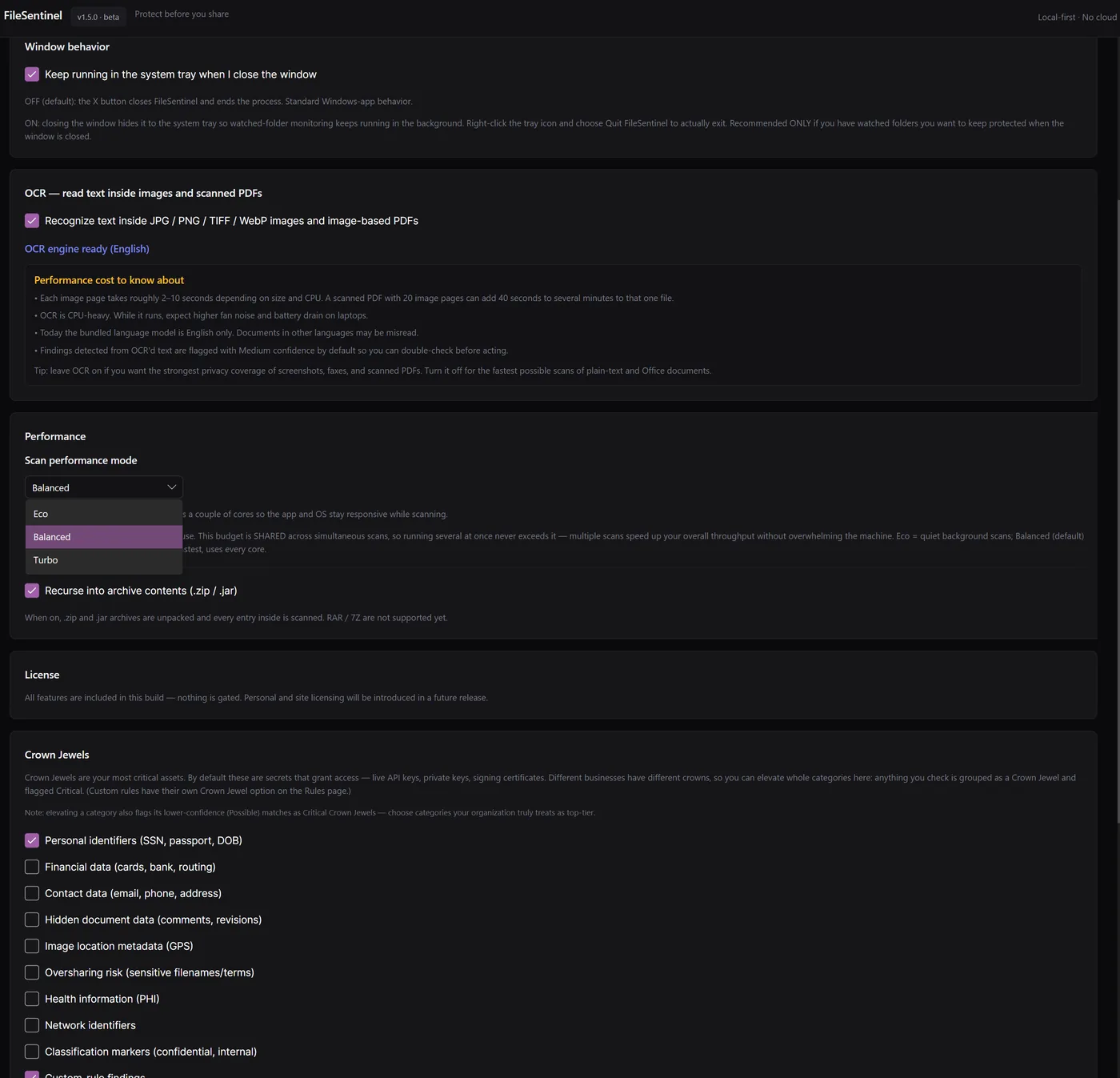
Choose a performance mode (Eco, Balanced, or Turbo), turn OCR on for the strongest coverage, recurse into archives, keep it running in the system tray, and define exactly which categories count as your Crown Jewels.
FAQ
Frequently asked questions.
Does FileSentinel upload my files to the cloud?
What kinds of sensitive data does it find?
Can it read text inside images and scanned PDFs?
Can it remove or redact what it finds?
What are Crown Jewels?
What operating systems does it support?
How much does it cost?
How do I get it?
Support
Questions? Open a channel.
Setup help, feature requests, or a privacy question. The support page and a direct line to the team are one click away.
Support articles: filesentinel-support.html
Windows: Microsoft Store
Mac: Mac App Store
Phone: (551) 236-3191, business hours, US Eastern time